> For the complete documentation index, see [llms.txt](https://docs.zenml.io/llms.txt). Markdown versions of documentation pages are available by appending `.md` to page URLs; this page is available as [Markdown](https://docs.zenml.io/user-guides/agents-guide/06-hitl.md).
# Human in the loop
Some steps an agent should not take alone, no matter how well-scoped the tool is: posting to a live channel, an expensive-to-undo fork, a judgment call the model shouldn't make. Stage 6 lets the agent stop mid-task, ask a person, and resume from exactly where it paused — without holding a process open while it waits.
This is the same durability that records every checkpoint in [Stage 1](/user-guides/agents-guide/01-durable-agent.md), now used to survive a human in the loop. The flow's progress lives in durable storage, so the wait can outlast the process that started it.
{% hint style="info" %}
This walkthrough uses `stage_6_hitl.py` from the runnable Agent Harness Platform example. If you have not cloned the repo yet, start with [Get the code](/user-guides/agents-guide.md#get-the-code) on the overview page.
{% endhint %}
## Why not just call `input()`
`input()` blocks one Python process and bets nothing interrupts it. The entire half-finished run lives only in that process. If the operator takes four hours to answer, the process sits pinned open the whole time; a reboot, deploy, or pod eviction in that window loses the run with no way to resume. And the answer can only ever come from that one keyboard.
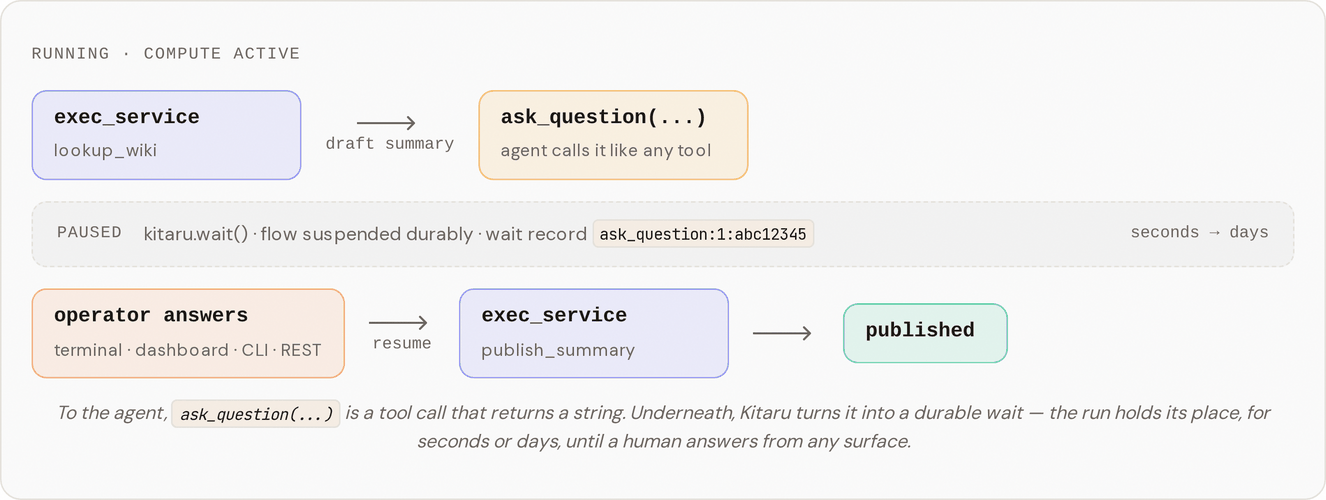
Stage 6 adds `ask_question`, a tool the agent calls like any other. From the agent's side it's boring: it calls `ask_question("What suffix should I add before publishing?")` and a moment later gets a string back. Underneath, the flow pauses on a durable wait record.
## Run it
### One-time setup
Stage 6 reuses the typed services and mocks from Stages 4 and 5. If you skipped those, run the setup script once; it builds the images and creates the `wiki-token` and `webhook-token` secrets. It is idempotent.
```bash
bash setup.sh
```
Then pick how you want to answer the question. Both paths do the same thing; they differ only in where the answer comes from.
{% tabs %}
{% tab title="Interactive" %}
Recommended for your first run.
```bash
DISABLE_CACHE=1 uv run python stage_6_hitl.py
```
When the agent calls `ask_question`, the local runtime prompts you on the same terminal. Type your answer, hit enter, and the flow resumes.
{% endtab %}
{% tab title="Non-interactive" %}
The server-shaped path: the flow runs, pauses, and an operator answers from somewhere else.
```bash
DISABLE_CACHE=1 uv run python stage_6_hitl.py --value '"Verified by ops on call"'
```
This is the shape you'd use in production: the flow runs on a server, and the operator answers through the dashboard, the CLI, or the REST API. The run resumes from the same point and finishes.
{% endtab %}
{% endtabs %}
{% hint style="info" %}
In local runs the runtime polls for input until a 600s timeout, so the non-interactive path really does wait for the CLI command above. If you never answer, the flow times out. Deployed runs behave the same way; only the location of the wait record differs.
{% endhint %}
## What you should see in the logs
The agent's skill (`skills/with-hitl/default-agent/SKILL.md`) runs five steps: look up `lookup_wiki(topic="durability")` (the typed service from [Stage 5](/user-guides/agents-guide/05-typed-services.md)), draft a summary, call `ask_question(...)` (the flow pauses here), append the answer, and publish with `publish_summary`. One durable flow: lookup, then a pause for a human, then the publish.
The pause is the line to watch for:
```
Kitaru: Checkpoint `default` started.
… (skill list/read, exec_service lookup_wiki)
Kitaru: Waiting on `ask_question:1:abc12345` (type=external_input, timeout=600s, poll=5s)
↑ flow paused here
… (operator runs `uv run kitaru executions input … --value '"Verified by ops on call"'`)
Kitaru: HTTP Request: POST … ← agent resumes with the answer
… (exec_service publish_summary)
Kitaru: Checkpoint `default` finished in 1m12s.
Published 4f12a87bc394 at 1777892841: Durable execution persists every checkpoint output. Verified by ops on call.
```
Everything above the `Waiting on ...` line had already run; everything below it ran only once the answer arrived. Inspect the finished run from the CLI or the dashboard:
```bash
uv run kitaru executions list # find the execution_id
uv run kitaru executions get # status, turn output, wait history, artifacts
uv run kitaru executions logs # the runtime logs again
```
## What just happened
Two libraries split the work, the same as Stage 1. PydanticAI ran the agent loop and called `ask_question` like any other tool — it has no idea a human was involved. Kitaru made that possible: the adapter routes `ask_question` through [`kitaru.wait()`](https://docs.zenml.io/kitaru/guides/wait-and-resume), which writes a wait record to durable storage.
In this local run the process stays alive and polls so you can watch the pause. In a deployed run the flow can stop instead of blocking: the process exits, the compute is handed back, hours pass with nothing running. When an answer arrives — from the terminal, dashboard, CLI, or a REST call — Kitaru loads the run back from the durable record and `ask_question(...)` returns the answer, as if a slow function had returned.
That's the difference from `input()`. `input()` keeps the run in one process and hopes nothing interrupts it. `kitaru.wait()` writes down where the run is, so the wait survives even when the runtime is allowed to stop. The four-hour wait costs you nothing, and a reboot in the middle doesn't lose the run.
## Replay reuses the answer
Run the stage once, answer the question, then replay it:
```bash
uv run kitaru executions replay --from default
```
Replay re-runs the agent turn with everything before it served from cache — and it does **not** prompt you for `ask_question` again. The first answer is replayed straight from the saved run.
That's because every wait gets a stable name of the form `ask_question::`. The call index distinguishes two same-text questions in one turn; the question hash keeps the name identical across replays as long as the agent asks the same thing at the same point. Because the name matches, replay finds the answer already given and reuses it. To feed in a *different* answer on replay, see [Replay and Overrides](https://docs.zenml.io/kitaru/guides/replay-and-overrides).
## How it works
Three files carry the change:
* `agent_harness_platform/tools.py` adds the `ask_question` tool. Its body calls `wait_for_input(question=..., name=...)` from the Kitaru PydanticAI adapter and coerces the result to a string for the agent's tool-result contract.
* `agent_harness_platform/profile.py` already listed `ask_question` in its `ToolName` set; Stage 6 turns it on in `allowed_tools`.
* `skills/with-hitl/default-agent/SKILL.md` is the five-step procedure above.
The example writes almost no HITL-specific code: the `wait_for_input` call is the only piece. The adapter handles suspend-and-resume, so the tool body reads like an ordinary function that happens to take a while. The wait schema is left open (any JSON), so the operator can answer with a plain string or a structured value; the tool body coerces it to a string before handing it to the agent.
{% hint style="warning" %}
**Teaching shortcuts.** The tool calls `wait_for_input(...)` directly instead of the shipped `@hitl_tool(schema=...)` decorator, which persists the `schema` (a Python `type`) into wait metadata — that doesn't round-trip cleanly on the local stack today, so the direct call gives the same external behavior without the snag. Operator input also flows through unescaped: it becomes the tool's return value, gets appended to the summary, and is posted to the webhook with no escaping.
{% endhint %}
## Taking it to production
On a server the operator answers through the dashboard, CLI, or REST API instead of a local terminal prompt — the non-interactive run above is already that shape. Two things to fix before you rely on it:
* **Escape operator input.** The example passes it through unescaped. Before handing it to anything that interprets the bytes (an HTML renderer, a shell, a SQL query), escape it yourself.
* **Exempt `ask_question` from per-tool checkpoints.** This tour uses the teaching setting `checkpoint_strategy="turn"`, so `ask_question` isn't wrapped in its own tool checkpoint. If you switch to the default `checkpoint_strategy="calls"` ([Stage 1](/user-guides/agents-guide/01-durable-agent.md)), pass `tool_checkpoint_config_by_name={"ask_question": False}` to `KitaruAgent`. The other tools (`exec`, `skill`, `exec_service`) stay per-call checkpointed.
## Where this leaves us
That's the full Agent Harness Platform. You started with a plain PydanticAI agent and a durable record of finished work, then added a sandbox, editable skills, a credential proxy, typed services, and now a durable pause for human judgment. Each layer narrowed what the agent can do on its own, and none of them made you rewrite the agent as a state machine.
Replay works the same on this flow as on any other. For the full run → replay → improve loop, see [Replay and improve](/user-guides/agents-guide/replay-and-improve.md); for the underlying override mechanics, see [Replay and Overrides](https://docs.zenml.io/kitaru/guides/replay-and-overrides).
If you're weighing this pattern for real use, [Production notes and upgrade paths](/user-guides/agents-guide/production-notes.md) gathers every teaching stand-in from the tour in one place and lists what to harden first.
---
# Agent Instructions
This documentation is published with GitBook. GitBook is the documentation platform designed so that both humans and AI agents can read, navigate, and reason over technical content effectively. Learn more at gitbook.com.
## Querying This Documentation
If you need additional information that is not directly available in this page, you can query the documentation dynamically by asking a question.
Perform an HTTP GET request on the current page URL with the `ask` query parameter, and the optional `goal` query parameter:
```
GET https://docs.zenml.io/user-guides/agents-guide/06-hitl.md?ask=&goal=
```
`ask` is the immediate question: it should be specific, self-contained, and written in natural language.
`goal` is optional and describes the broader end goal you are ultimately trying to accomplish on behalf of the user. GitBook uses it to tailor the answer towards what is most useful for that goal.
The response will contain a direct answer to the question and relevant excerpts and sources from the documentation.
Use this mechanism when the answer is not explicitly present in the current page, you need clarification or additional context, or you want to retrieve related documentation sections.