> For the complete documentation index, see [llms.txt](https://docs.zenml.io/llms.txt). Markdown versions of documentation pages are available by appending `.md` to page URLs; this page is available as [Markdown](https://docs.zenml.io/user-guides/agents-guide/05-typed-services.md).
# Typed services
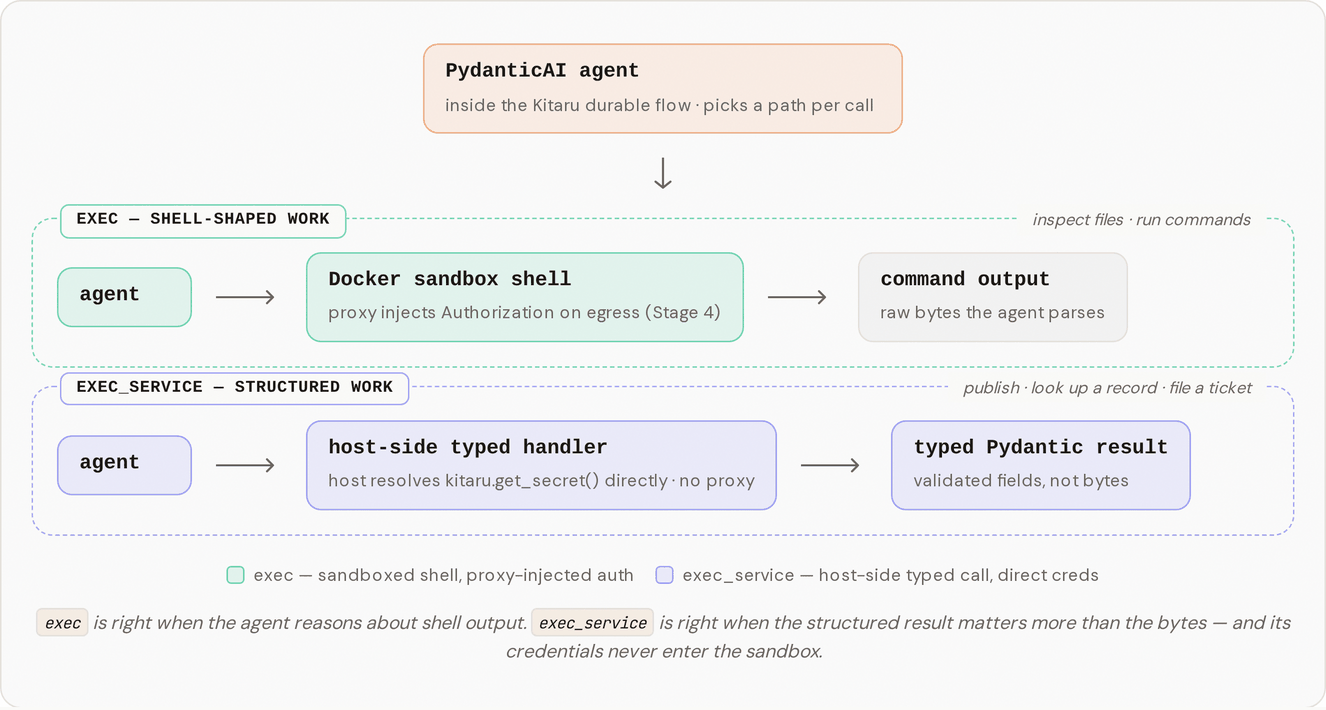
By [Stage 4](/user-guides/agents-guide/04-credential-proxy.md) the agent could reach internal HTTP endpoints without ever holding a secret. But it still acted by hand-assembling `curl` calls, and a hand-assembled call is exactly where a model slips: wrong webhook, dropped field, a `500` read as success. Stage 5 replaces that for structured actions. The agent names an action and fills in typed arguments; a dispatcher you control runs the matching handler in your host process and hands back a typed result. The boundary is the point: the platform decides which actions exist and which agent may call them.
{% hint style="info" %}
This walkthrough uses `stage_5_typed_services.py` from the runnable Agent Harness Platform example. If you have not cloned the repo yet, start with [Get the code](/user-guides/agents-guide.md#get-the-code) on the overview page.
{% endhint %}
## Two tools, two shapes of work
A shell is right when the agent reasons over command output (read a file, grep a log). It is wrong the moment the agent wants one specific structured action and cares about the result, not the bytes.
So Stage 5 keeps `exec` and adds `exec_service`. The agent calls a named service with typed arguments and gets a typed result. Two ship with the example:
* `lookup_wiki` takes a topic and returns wiki snippets as structured objects, not text to parse.
* `publish_summary` takes a summary, posts it to a webhook, and returns the `message_id` and timestamp.
The agent only sees the services its profile allows. The `exec_service` tool description is built from the profile's `allowed_services` set, so an agent that can't publish never sees `publish_summary`.
## Run it
Stage 5 uses the same `setup.sh` as earlier stages plus one new secret (`webhook-token`) for the publish call. It is idempotent.
```bash
bash setup.sh
DISABLE_CACHE=1 uv run python stage_5_typed_services.py
```
`DISABLE_CACHE=1` forces every checkpoint to re-execute so you get a clean run while learning. The agent's skill mixes both paths on purpose: `exec` to read some OS facts out of the sandbox, then `exec_service` for the typed lookup and publish. It ends with a `Published ...` line.
## What you should see
```
[mock-services] Started container … (host=http://localhost:54321)
[proxy] Started container … (injecting for hosts=['wiki.local'])
[sandbox] Started container … (proxy-wired)
Kitaru: Checkpoint `default` started.
[sandbox] $ cat /etc/os-release
[sandbox] → exit=0, stdout=286 chars, cwd=/workspace
[sandbox] $ uname -r
[sandbox] → exit=0, stdout=17 chars, cwd=/workspace
[mock-services] GET /snippets/durability (host=localhost:54321, auth=Bearer w…) → 200
[mock-services] POST /webhooks/team-summaries (host=localhost:54321, auth=Bot we…) → 200
Kitaru: Checkpoint `default` finished in 26.5s.
Published at : .
```
Notice what's missing. The two `exec` commands show as `[sandbox] $ ...` lines because they ran inside the worker container. The `lookup_wiki` and `publish_summary` calls have no `[sandbox]` lines at all — only the two `[mock-services]` HTTP lines, because they ran in your host process and went straight to the service. The `[proxy]` line shows up only at startup and teardown; it sits idle through the service work because nothing routed an HTTP call through the sandbox.
## Two credential paths, for two kinds of work
The agent did two kinds of work, and each went down its own path. The OS-info steps are shell-shaped: `exec` runs them inside the sandbox, isolated from your machine. The lookup and publish are not: the agent named the service, handed over typed arguments, and `exec_service` ran the handler in your host process, where the handler resolved its own credential with `kitaru.get_secret(...)`.
That host-side path is why the proxy stayed idle. The Stage 4 proxy injects credentials for HTTP leaving the sandbox; the handlers never enter the sandbox, so a webhook token or control-plane credential never travels into the sandbox network at all.
| Path | Where it runs | How it gets credentials |
| ---------------------- | ---------------------------- | --------------------------------------------------------------------- |
| `exec` (shell) | inside the sandbox container | the proxy injects the `Authorization` header on the way out (Stage 4) |
| `exec_service` (typed) | in your host process | the handler resolves `kitaru.get_secret(...)` itself (Stage 5) |
## See the boundary do its job
Open `stage_5_typed_services.py` and narrow the profile from both services to just the lookup:
```python
allowed_services={"lookup_wiki"},
```
Re-run with `DISABLE_CACHE=1`. The agent still looks up the wiki snippet, but `publish_summary` is no longer in the tool description it sees — so it does the lookup and reports that it can't publish, rather than quietly calling an action it was never granted. That set is the agent's reach. Shrink the set, shrink the reach.
## How the pieces fit
Adding a service touches a small set of files, each with one job:
* `agent_harness_platform/services/schemas.py` — Pydantic args/result models per service (`LookupWikiArgs`, `LookupWikiResult`, `PublishSummaryArgs`, `PublishSummaryResult`, `WikiSnippet`).
* `agent_harness_platform/services/registry.py` — maps each service name to its `(args_model, handler, summary)` triple in `ALL_SERVICES`, and `build_service_description(allowed)` renders the tool description from the allowed set.
* `agent_harness_platform/services/lookup_wiki.py` and `publish_summary.py` — the host-side handlers. Each resolves its credential with `kitaru.get_secret(...)` and makes one HTTP call.
* `agent_harness_platform/tools.py` — builds `exec_service`. It validates `args` against the right Pydantic model on every call, so a malformed argument dict comes back to the agent as a readable `ValidationError` instead of crashing the handler.
* `agent_harness_platform/profile.py` — adds the `allowed_services` field the tool description is built from.
* `mocks/server.py` / `mocks/runner.py` — add the `POST /webhooks/{webhook_id}` endpoint and publish the mock on a free port.
* `skills/with-services/default-agent/SKILL.md` — the procedure the agent follows.
Two design choices are worth calling out. The tool takes a flat `(service_name, args)` shape rather than a typed union of every service, because some providers handle JSON-Schema `oneOf`/`anyOf` inconsistently; a plain `service_name: str` plus `args: dict` re-validated by name is reliable across providers. And HTTP failures come back as typed results, not exceptions: the handlers catch `urllib.error.HTTPError` and return an error-shaped field, so the model can reason about the failure instead of the turn blowing up.
## From mock to real
Everything here talks to a local mock (`mocks/server.py`), not a real internal API. For a real fork, swap the mock handlers for your services and add per-service authorization at the typed boundary — the natural place to enforce which agent may call which action. Adding a service is three files: a `.py` handler, an args/result pair in `schemas.py`, and an entry in `ALL_SERVICES`. The tool and its description pick up the new service on their own.
## Where this leaves us
The agent now has two clean ways to act: reason over command output with `exec` inside the sandbox, and take specific, structured actions through a dispatcher you control. Between the sandbox, the skill files, the credential proxy, and now typed services, you've narrowed what the agent can do to a set of actions you approve of.
But narrowing isn't judgment. Some approved actions still shouldn't fire on the model's say-so alone — posting to a live channel can't be undone, and some forks in a task are a person's call. The next stage gives the agent a way to stop and ask, then pick the run back up once the answer comes in.
---
# Agent Instructions
This documentation is published with GitBook. GitBook is the documentation platform designed so that both humans and AI agents can read, navigate, and reason over technical content effectively. Learn more at gitbook.com.
## Querying This Documentation
If you need additional information that is not directly available in this page, you can query the documentation dynamically by asking a question.
Perform an HTTP GET request on the current page URL with the `ask` query parameter, and the optional `goal` query parameter:
```
GET https://docs.zenml.io/user-guides/agents-guide/05-typed-services.md?ask=&goal=
```
`ask` is the immediate question: it should be specific, self-contained, and written in natural language.
`goal` is optional and describes the broader end goal you are ultimately trying to accomplish on behalf of the user. GitBook uses it to tailor the answer towards what is most useful for that goal.
The response will contain a direct answer to the question and relevant excerpts and sources from the documentation.
Use this mechanism when the answer is not explicitly present in the current page, you need clarification or additional context, or you want to retrieve related documentation sections.