> For the complete documentation index, see [llms.txt](https://docs.zenml.io/llms.txt). Markdown versions of documentation pages are available by appending `.md` to page URLs; this page is available as [Markdown](https://docs.zenml.io/kitaru/guides/returns-agent.md).
# Complete returns agent tutorial
Investigate supplied returns agent traces and test one evidence-led improvement.
This tutorial applies Kitaru's complete method to a small customer-support agent. The agent looks up orders, return policies, and shipments, then chooses whether to refund, replace, or escalate each request.
You begin with ten recorded PydanticAI sessions exported from Langfuse. The walkthrough does not reveal or use the example's test-only expected outcomes. You will survey the population, inspect complete traces, record your own judgments, define one observable behavior, freeze its reviewed evidence, and test one bounded agent change.
The tutorial is intentionally more detailed than the [Quickstart](/kitaru/getting-started/quickstart.md). It explains what each resource preserves and why each command is part of the evidence chain. Your exact sessions, questions, evaluator, candidate, and result will depend on what you observe.
## Meet the example agent
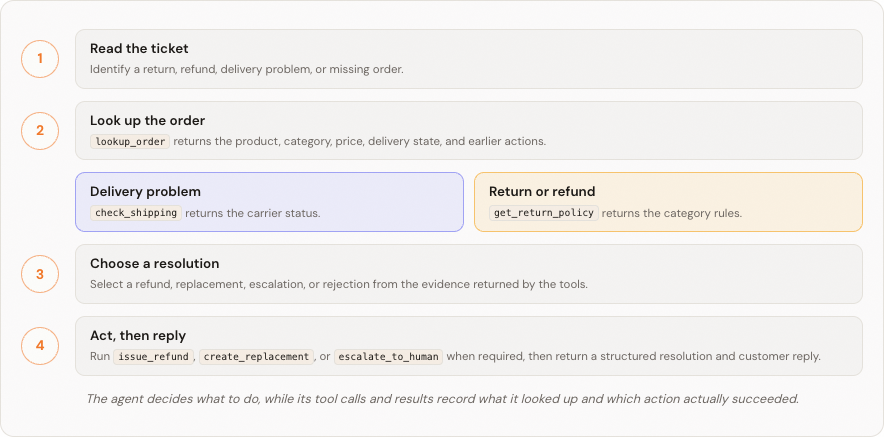
Each session starts with one synthetic customer ticket. The agent looks up the order, gathers the relevant policy or shipping evidence, chooses one terminal outcome, and returns a structured resolution with a customer reply.
The lookup tools gather evidence. The action tools record whether a refund, replacement, or escalation actually succeeded.
For return and refund requests, `get_return_policy` supplies the rules for the order's product category. **Final sale** means the item is not eligible for an ordinary return. A reported defect can still qualify when the category has a final-sale defect exception.
| Category | Return window | Final-sale defect exception | Human approval threshold |
| ----------- | ------------- | --------------------------- | ------------------------ |
| Footwear | 30 days | Yes | $150 |
| Apparel | 30 days | Yes | $150 |
| Accessories | 14 days | No | $100 |
| Luggage | 45 days | Yes | $200 |
These values are evidence available to the agent, not guarantees enforced by Kitaru. The tutorial asks you to inspect whether the agent used that evidence correctly and whether the recorded action agrees with its final response.
## What you will build
| Phase | You will create | Why it exists |
| ----------------------------------------------------- | ------------------------------------------------------------------------------------------------------------------------------------------------------------------------------------------------------------------- | ----------------------------------------------------------------------------------- |
| [1. Observe](/kitaru/guides/returns-agent/observe.md) | A verified [agent version](/kitaru/core-concepts/agents-and-sessions.md), ten imported [sessions](/kitaru/core-concepts/agents-and-sessions.md), and descriptive [evaluations](/kitaru/core-concepts/evaluators.md) | Confirm what the example preserved and select a bounded, varied review worklist. |
| [2. Judge](/kitaru/guides/returns-agent/judge.md) | An [investigation](/kitaru/core-concepts/investigations.md), evidence-linked annotations, and verdicts | Store what a human concluded without rewriting the trace. |
| [3. Define](/kitaru/guides/returns-agent/define.md) | One accepted behavior, an immutable [cohort version](/kitaru/core-concepts/cohorts.md), and an evaluator version | Turn reviewed evidence into a repeatable measurement. |
| [4. Replay](/kitaru/guides/returns-agent/replay.md) | A candidate agent version, [experiment](/kitaru/core-concepts/experiments.md), and experiment run | Run one bounded change against the frozen population under an explicit tool policy. |
| [5. Compare](/kitaru/guides/returns-agent/compare.md) | Paired baseline and replay evidence | Decide whether the result is improved, regressed, a trade-off, or inconclusive. |
Each page begins with the same five-step map. The first four phase pages end with a **Checkpoint**, and the final page summarizes the complete evidence chain. Because this is evidence-led, placeholders such as `YOUR_SESSION_UUID` are deliberate: substitute IDs produced by your own review rather than copying a predetermined ticket list.
## Prepare the PydanticAI returns agent
Install `jq`, then open the [PydanticAI returns agent README](https://github.com/zenml-io/kitaru/tree/main/examples/python/pydantic_ai_ticket_resolver) and complete its setup through the ten-session confirmation. That README is the source of truth for cloning, entering the example directory, the frozen environment, workspace selection, agent registration, worker startup, and the checked-in Langfuse import. Keep running the commands below from the example directory.
The example uses synthetic customers, orders, shipments, and actions. Refund and replacement tools modify only an isolated in-memory store. No model-provider or Langfuse credentials are needed for setup, import, or the deterministic parts of this tutorial.
Before continuing, confirm these conditions from the example README:
* the selected workspace does not already contain tutorial resources named `returns-resolver`, `returns-discovery`, `returns-regression`, `returns-behavior`, or `returns-candidate`;
* `returns-resolver@1` is registered from the example directory;
* ten imported sessions have the `returns-baseline` tag; and
* the example worker remains running in the second terminal.
Stop and select another workspace if those resource names already exist. Do not delete an existing workspace merely to make its names available.
Some tutorial commands create jobs. The [worker](/kitaru/core-concepts/workers.md) claims those jobs and performs the work in your environment, so the Kitaru server does not receive your agent code or model credentials. Keep the example worker running while you Observe, Judge, and Define. In the Replay phase you will restart it with `OPENAI_API_KEY` before any paid model call.
## Prefer a coding agent?
The pages that follow teach the manual path so you can see each object and boundary. If you want an agent to guide the same evidence loop, install the [Kitaru skills](/kitaru/getting-started/setup.md) and use the guided-tour prompt in the [PydanticAI returns agent README](https://github.com/zenml-io/kitaru/tree/main/examples/python/pydantic_ai_ticket_resolver).
## Start the investigation
Continue to [1. Observe the recorded behavior](/kitaru/guides/returns-agent/observe.md).
---
# Agent Instructions
This documentation is published with GitBook. GitBook is the documentation platform designed so that both humans and AI agents can read, navigate, and reason over technical content effectively. Learn more at gitbook.com.
## Querying This Documentation
If you need additional information that is not directly available in this page, you can query the documentation by asking a question.
Perform an HTTP GET request on the following URL with the `ask` and `goal` query parameters:
```
GET https://docs.zenml.io/kitaru/guides/returns-agent.md?ask=&goal=
```
`ask` is the immediate question: it should be specific, self-contained, and written in natural language.
`goal` is what the user is ultimately trying to achieve, the reason they need the answer. Sharing it helps GitBook give you a better, more relevant answer. A goal is most helpful when it describes the outcome the user wants rather than restating the question. For example, with `ask=how do I create an API token`, a goal like `automate deployments from our CI pipeline` lets GitBook tailor the answer to that use case.
The response will contain a direct answer to the question and relevant excerpts and sources from the documentation.
Use this mechanism when the answer is not explicitly present in the current page, you need clarification or additional context, or you want to retrieve related documentation sections.