> For the complete documentation index, see [llms.txt](https://docs.zenml.io/llms.txt). Markdown versions of documentation pages are available by appending `.md` to page URLs; this page is available as [Markdown](https://docs.zenml.io/kitaru/agent-harness-platform/06-hitl.md).
# Human in the Loop
[Stage 5](/kitaru/agent-harness-platform/05-typed-services.md) narrowed what the agent can do. It reasons with `exec` inside the sandbox and takes specific actions with `exec_service`, and the profile decides which actions are even on the menu. That is a tight boundary. It still is not judgment.
Some calls should not be made by the model alone, no matter how well-scoped the tool is. Stage 6 gives the agent a way to stop in the middle of a task, ask a person a question, and wait for the answer, without pinning a process open the whole time it waits. When the answer arrives, the run continues from exactly where it paused.
{% hint style="info" %}
This walkthrough uses `stage_6_hitl.py` from the runnable Agent Harness Platform example. If you have not cloned the repo yet, start with [Get the code](/kitaru/agent-harness-platform/agent-harness-platform.md#get-the-code) on the overview page.
{% endhint %}
## When the agent should stop and ask
Picture the agent one step from the end of the Stage 5 task. It has drafted a summary, and the next thing it will do is post that summary to a live channel. Once it posts, it is posted: the webhook fires, the message is out, and there is no un-sending it. That is the kind of step where you want a person to sign off first. So is an ambiguous fork where guessing wrong is expensive to undo, or a judgment call the model should not make on its own.
The obvious way to ask is `input()`: stop and read a line from the keyboard. It works on your laptop right up until something goes wrong, and it is worth being concrete about what `input()` actually does. It blocks one specific Python process and waits. Everything the agent did to reach this point, the entire half-finished run, lives only in that one process and nowhere else. Now the person you are asking is stuck in meetings and takes four hours to answer. For those four hours a process sits pinned open, doing nothing. If the machine reboots, a deploy rolls out, or the pod gets evicted in that window, the run is gone: no record of where it was, no way to resume, nothing left for the person to answer. And the answer can only ever come from that one keyboard, never from a dashboard, a CLI on a server, or a web form.
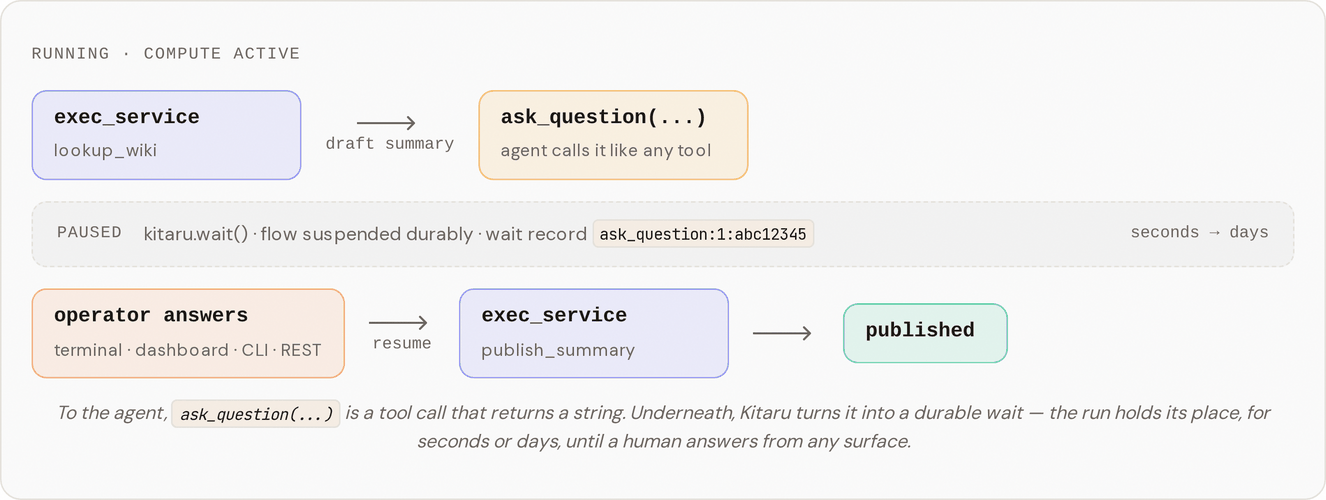
Stage 6 adds `ask_question`, a tool the agent calls exactly like any other. From the agent's side it is deliberately boring: it calls `ask_question("What suffix should I add before publishing?")` and, a moment later, gets a string back. As far as the agent knows, a slow function returned. Underneath, something very different happened:
## Run it
### One-time setup
Stage 6's skill reuses the typed services and mocks from Stages 4 and 5. If you skipped those, run the setup script once; it builds the images and creates the `wiki-token` and `webhook-token` secrets. It is idempotent.
```bash
bash setup.sh
```
Then pick how you want to answer the question. Both paths do the same thing; they differ only in where the answer comes from.
{% tabs %}
{% tab title="Interactive" %}
Recommended for your first run.
```bash
DISABLE_CACHE=1 uv run python stage_6_hitl.py
```
When the agent calls `ask_question`, the local runtime prompts you on the same terminal. Type your answer, hit enter, and the flow resumes.
{% endtab %}
{% tab title="Non-interactive" %}
The server-shaped path: the flow runs, pauses, and an operator answers from somewhere else.
```bash
DISABLE_CACHE=1 uv run python stage_6_hitl.py --value '"Verified by ops on call"'
```
This is the same shape you would use in production: the flow runs on a server, and the operator answers through the dashboard, the CLI, or the REST API. The run resumes from the same point and finishes.
{% endtab %}
{% endtabs %}
{% hint style="info" %}
In local runs, the runtime polls for input until a 600s timeout, so the non-interactive path really does wait for the CLI command above. If you never answer, the flow times out rather than resolving on its own. Deployed runs behave the same way; the only difference is where the wait record is stored.
{% endhint %}
## What you should see in the logs
The agent's skill (`skills/with-hitl/default-agent/SKILL.md`) walks through five steps:
1. Look up `lookup_wiki(topic="durability")`, the host-side typed service from [Stage 5](/kitaru/agent-harness-platform/05-typed-services.md).
2. Draft a one or two sentence summary from the first snippet.
3. Call `ask_question("What suffix should I add before publishing?")`. The flow pauses here.
4. Append the operator's answer to the summary.
5. Publish with `publish_summary`, which returns `{message_id, posted_at}`.
So the run goes: typed-service lookup, then a pause for a human, then the publish, all inside one durable flow. The pause is the line to watch for:
```
Kitaru: Checkpoint `default` started.
… (skill list/read, exec_service lookup_wiki)
Kitaru: Waiting on `ask_question:1:abc12345` (type=external_input, timeout=600s, poll=5s)
↑ flow paused here
… (operator runs `uv run kitaru executions input … --value '"Verified by ops on call"'`)
Kitaru: HTTP Request: POST … ← agent resumes with the answer
… (exec_service publish_summary)
Kitaru: Checkpoint `default` finished in 1m12s.
Published 4f12a87bc394 at 1777892841: Durable execution persists every checkpoint output. Verified by ops on call.
```
The `Waiting on ...` line is the moment the flow stopped. Everything above it had already run; everything below it ran only once the answer arrived. When it finishes, you can inspect the run from the CLI or the dashboard:
```bash
uv run kitaru executions list # find the execution_id
uv run kitaru executions get # status, turn output, wait history, artifacts
uv run kitaru executions logs # the runtime logs again
```
## What just happened?
Two libraries split the work, the same way they did in Stage 1.
PydanticAI ran the agent loop and called `ask_question` like any other tool. It has no idea a human was involved; from where it sits, a function took a while and returned a string.
Kitaru did the part that makes that possible. The adapter routes `ask_question` through [`kitaru.wait()`](/kitaru/guides/wait-and-resume.md), which writes a wait record to durable storage. In this local tutorial run, the Python process stays alive and polls until you answer, so you can watch the pause happen in one terminal. In a deployed run, the flow can stop instead of blocking: the process can exit, the compute can be handed back, and hours can pass with nothing running. When an answer finally arrives, from the terminal, the dashboard, the CLI, or a REST call, Kitaru loads the run back from that durable record and `ask_question(...)` returns the answer, as though it had been a slow function the whole time.
That is the difference from `input()`. `input()` keeps everything in one running process and bets that nothing interrupts it. `kitaru.wait()` writes down where the run is so the wait is durable even when the runtime is allowed to stop. In production, the four-hour wait costs you nothing while it waits, and a reboot in the middle does not lose the run.
## Try one small change
Run the stage once and answer the question. Then replay it:
```bash
uv run kitaru executions replay --from default
```
Replay re-runs the agent turn with everything before it served from cache. The thing to watch for is what doesn't happen: you are not prompted to answer `ask_question` again. The first answer is replayed straight from the saved run.
That is not luck. Every wait gets a stable name of the form `ask_question::`. The call index keeps two same-text questions in one turn distinct, and the question hash keeps the name identical across replays as long as the agent asks the same thing at the same point. Because the name matches, replay finds the answer that was already given and reuses it instead of stopping to ask a second time. If you would rather feed in a different answer on replay than reuse the saved one, that is what [Replay and Overrides](/kitaru/guides/replay-and-overrides.md) covers.
## How it works
Three files carry the change:
* `agent_harness_platform/tools.py` adds the `ask_question` tool. Its body calls `wait_for_input(question=..., name=...)` from the Kitaru PydanticAI adapter and coerces whatever comes back to a string for the agent's tool-result contract.
* `agent_harness_platform/profile.py` already listed `ask_question` in its `ToolName` set; Stage 6 just turns it on in `allowed_tools`.
* `skills/with-hitl/default-agent/SKILL.md` is the five-step procedure above.
What keeps this small is that the example writes almost no HITL-specific code. The `wait_for_input` call inside the tool body is the only piece of it. The adapter handles the suspend-and-resume mechanics, so the tool body reads like an ordinary function that happens to take a while. The wait's schema is left open (any JSON), so the operator can answer with a plain string or a structured value; the tool body coerces the result to a string before handing it to the agent.
The one constraint to know about is the per-tool checkpoint wrapper. Stage 6 runs the same teaching setting as the rest of the tour, `checkpoint_strategy="turn"`, so `ask_question` is not wrapped in its own tool checkpoint while the agent turn is running. That keeps the wait path simple for the tutorial.
## What's simplified for the tutorial
Two things here are teaching shortcuts. The tool calls `wait_for_input(...)` from its body instead of using the shipped `@hitl_tool(schema=...)` decorator; the decorator persists the `schema` value (a Python `type`) into the wait's metadata, and that does not round-trip cleanly on the local stack today, so calling `wait_for_input(...)` directly gives the same external behavior without the snag. And operator input flows straight through: whatever the operator answers becomes the tool's return value, gets appended to the summary, and is posted to the webhook, with no escaping and no re-prompting.
## Taking it to production
On a server the operator answers through the dashboard, CLI, or REST API instead of a local terminal prompt; the non-interactive run above is already that shape. One thing to fix before you rely on it: the example passes operator input through unescaped, so before you hand that input to anything that interprets the bytes (an HTML renderer, a shell, a SQL query), escape it yourself.
If you drop the teaching-only `checkpoint_strategy="turn"` and use the default `checkpoint_strategy="calls"` (the upgrade [Stage 1](/kitaru/agent-harness-platform/01-durable-agent.md) describes), exempt `ask_question` from per-tool checkpoints by passing `tool_checkpoint_config_by_name={"ask_question": False}` to `KitaruAgent`. The other tools (`exec`, `skill`, `exec_service`) stay per-call checkpointed.
## Where this leaves us
That is the full Agent Harness Platform. You started with a plain PydanticAI agent and a durable record of finished work, then added a sandbox, editable skills, a credential proxy, typed services, and now a durable pause for human judgment. Each layer narrowed what the agent can do on its own, and none of them made you rewrite the agent as a state machine.
Replay is not a stage of its own here. It is a general Kitaru primitive that works the same on any flow, not something specific to agent harness platforms, so it lives in [Replay and Overrides](/kitaru/guides/replay-and-overrides.md) rather than on its own Agent Harness Platform page.
If you are weighing this pattern for real use, [Production notes and upgrade paths](/kitaru/agent-harness-platform/production-notes.md) gathers every teaching stand-in from the tour in one place and lists what to harden before you depend on it.
---
# Agent Instructions
This documentation is published with GitBook. GitBook is the documentation platform designed so that both humans and AI agents can read, navigate, and reason over technical content effectively. Learn more at gitbook.com.
## Querying This Documentation
If you need additional information that is not directly available in this page, you can query the documentation dynamically by asking a question.
Perform an HTTP GET request on the current page URL with the `ask` query parameter, and the optional `goal` query parameter:
```
GET https://docs.zenml.io/kitaru/agent-harness-platform/06-hitl.md?ask=&goal=
```
`ask` is the immediate question: it should be specific, self-contained, and written in natural language.
`goal` is optional and describes the broader end goal you are ultimately trying to accomplish on behalf of the user. GitBook uses it to tailor the answer towards what is most useful for that goal.
The response will contain a direct answer to the question and relevant excerpts and sources from the documentation.
Use this mechanism when the answer is not explicitly present in the current page, you need clarification or additional context, or you want to retrieve related documentation sections.