> For the complete documentation index, see [llms.txt](https://docs.zenml.io/llms.txt). Markdown versions of documentation pages are available by appending `.md` to page URLs; this page is available as [Markdown](https://docs.zenml.io/kitaru/agent-harness-platform/03-skills.md).
# Skills
Stage 2 put the agent's shell commands inside a container, so a bad command wrecks a throwaway workspace instead of your host. The agent now has a safer place to use a shell. What it actually does with that shell, the steps it follows, is still frozen in Python.
In stages 1 and 2 the agent's procedure lives in its system prompt, written as a string literal in the agent code. That is fine while the only person who ever changes the procedure is the engineer who wrote it. It stops being fine the moment the person who wants to change the steps is not the person who owns the code.
{% hint style="info" %}
This walkthrough uses `stage_3_skills.py` from the runnable Agent Harness Platform example. If you have not cloned the repo yet, start with [Get the code](/kitaru/agent-harness-platform/agent-harness-platform.md#get-the-code) on the overview page.
{% endhint %}
## When changing a step means changing code
An agent's real instructions are a procedure: which commands to run, what to check before it calls a task done, how to summarize what it found, when to stop. Those steps change often, and the person who wants to change them is usually not the person who owns the agent's Python.
Picture a support lead who wants the triage agent to run one extra verification before it reports "done." In plain English that is a single sentence. But while the procedure is a string literal in the system prompt, that one sentence turns into a project: find the engineer who owns the agent, get them to edit the string, open a pull request, wait for review, wait for a deploy. Until all of that lands, every agent in production keeps running the old steps. The change was trivial; the path to ship it was not. And sitting in source next to tool wiring and imports, the procedure is hard to even read, let alone review.
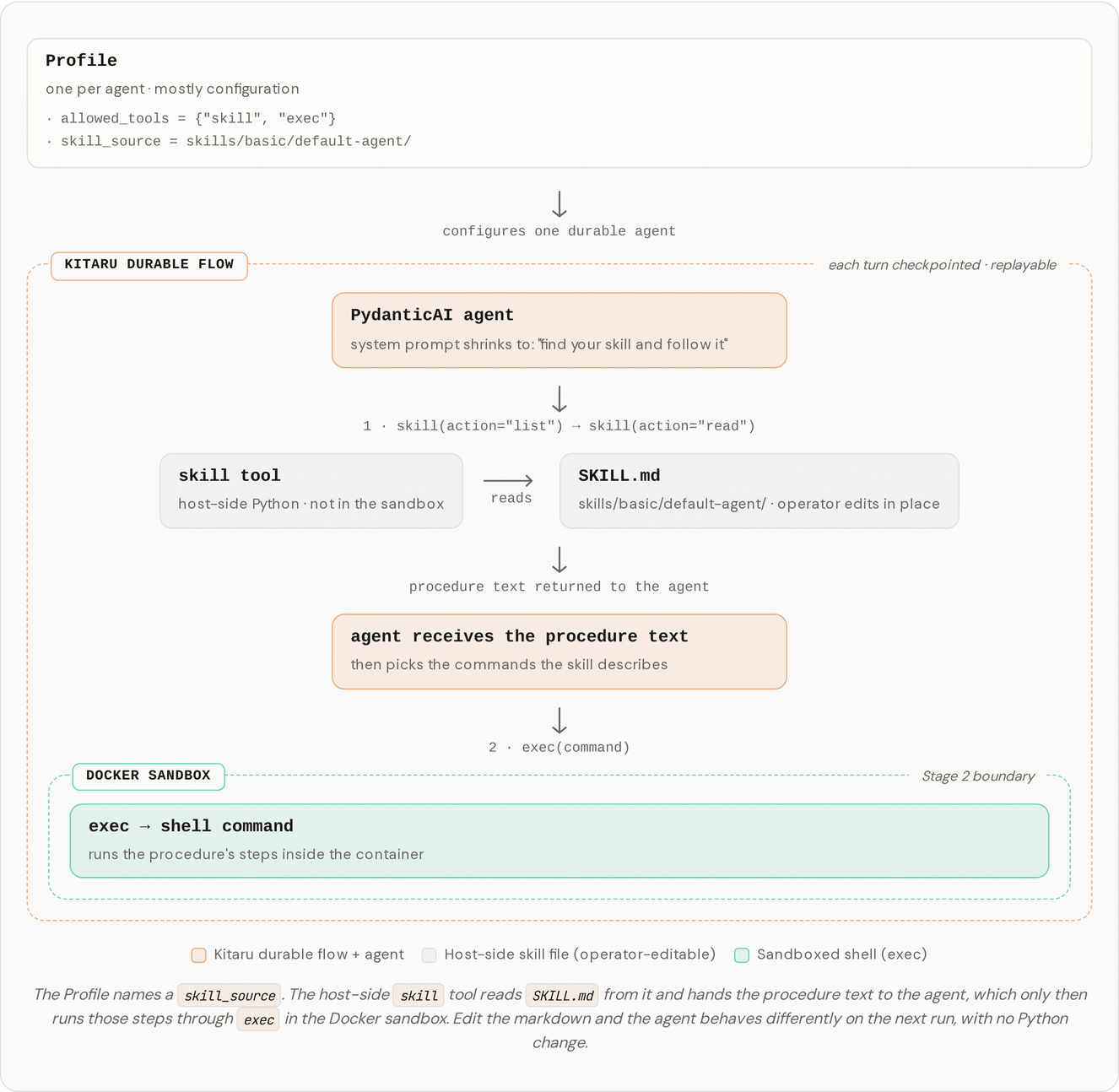
Stage 3 pulls the procedure out of the code. It adds a `skill` tool, and the system prompt shrinks to a single instruction: find your skill and follow it. The steps themselves live in a markdown file, `skills/basic/default-agent/SKILL.md`, that an operator edits in their own editor. The agent calls `skill(action="list")` to discover its skill files, `skill(action="read", path=...)` to load one, then carries out what it read using the `exec` tool from the earlier stages. Edit the markdown, re-run, and the agent behaves differently with no change to Python.
## One-time setup
Stage 3 runs its shell commands in the same Docker sandbox as [Stage 2](/kitaru/agent-harness-platform/02-sandbox.md). If you skipped that stage, build the image once:
```bash
docker build -t agent-harness-platform-sandbox -f docker/sandbox.Dockerfile docker/
```
Or run `bash setup.sh` to build everything at once.
## Run it
```bash
DISABLE_CACHE=1 uv run python stage_3_skills.py
```
{% hint style="info" %}
When you are iterating on a `SKILL.md`, keep `DISABLE_CACHE=1` set. Otherwise the previous run's turn output is served from cache and your edits will not visibly change anything until the cache is invalidated.
{% endhint %}
## What you should see in the logs
Watch the agent find its skill, read it, then act on it:
```
[sandbox] Started container 14f809c4f370 (image=agent-harness-platform-sandbox, /workspace ← workspace_…)
Kitaru: Checkpoint `default` started.
Kitaru: HTTP Request: POST https://api.openai.com/v1/chat/completions ← LLM turn that decides to call skill(action="list")
Kitaru: HTTP Request: POST https://api.openai.com/v1/chat/completions ← LLM turn that decides to call skill(action="read", path=...)
Kitaru: HTTP Request: POST https://api.openai.com/v1/chat/completions ← LLM turn after reading the skill, decides to call exec
[sandbox] $ cat /etc/os-release
[sandbox] → exit=0, stdout=285 chars, cwd=/workspace
[sandbox] $ uname -r
…
```
`skill` is a plain host-side Python function, not an HTTP call. The `Kitaru: HTTP Request: POST ...` lines are the model turns that *decide* to call it: one turn decides to list the skills, the next decides to read one, and the turn after that, now holding the procedure, decides to run the first `exec` command.
## What just happened?
PydanticAI could already call a tool that opens a markdown file and hands the text to the model. That part is ordinary. What this stage adds is everything around that read: where it sits, who is allowed to do it, and how easily you can point it somewhere else.
The read-and-act cycle runs inside a durable flow. The agent reads its skill and acts on it inside `agent_harness_platform_flow`, a `@kitaru.flow`, and each `agent.run_sync()` turn is checkpointed, which is the same durability from [Stage 1](/kitaru/agent-harness-platform/01-durable-agent.md). In this tutorial mode the whole turn is the unit of caching: once a turn finishes, a replay serves it from cache instead of re-running its model and tool calls, while a turn that crashed partway through re-executes in full, re-reading the skill and repeating its steps. (Reuse at the finer grain of individual model or tool calls is what the default `checkpoint_strategy="calls"` adds; see Stage 1's note.) A plain script gets none of this. A crash there throws away even the turns that already finished.
Whether an agent can read a procedure, and where it reads from, travels with the agent rather than living in shared code. `skill_source` is a field on `Profile`, right beside `model`, `system_prompt`, and `allowed_tools`, so two agents in the same harness platform can point at two different skill sources, and that difference is part of what makes them different agents. The source also sits behind a seam you can swap: the tool only ever sees a directory of markdown, never where it came from, so a fork can change where procedures live without touching the tool.
The durable, replayable flow is the part Kitaru gives you. The profile gating, the skill source as configuration, and the swappable seam are structure this example builds on top. You want that structure once more than one agent, and more than one person, are editing procedures.
## How the code fits together
Three files carry the stage:
* `agent_harness_platform/tools.py` holds the `skill` tool factory, with `list`, `read`, and `search` actions, a default `**/SKILL.md` glob, a cap on how many bytes a single read returns, and an `.is_relative_to(skills_root)` check that rejects any path trying to climb out of the skills directory.
* `agent_harness_platform/profile.py` defines `LocalSkillSource(path=...)` and the `SkillSource` alias, which carries the single `resolve() -> Path` method the tool relies on.
* `skills/basic/default-agent/SKILL.md` is the procedure itself, the file an operator edits. It says which commands to run, what to summarize, and how to return.
Access is gated in two places. `build_agent` resolves `profile.skill_source` to a directory and hands that directory to `build_tools`. `build_tools` only constructs the `skill` tool when `"skill"` is in `allowed_tools`, and it raises if the tool is allowed without a source. So an agent reaches its procedure only when its profile both opts into the tool and says where the files live.
The tool runs host-side, not inside the sandbox. The agent calls it from within a turn, and that turn runs inside the `@kitaru.flow`, so the read is part of the checkpointed, replayable execution. Because it reads straight from the host filesystem, operators edit `skills/...` in their editor without rebuilding an image or stepping into a container. The `.is_relative_to` check is the single boundary guarding that read.
## Try one small change
This is the stage where editing beats explaining. Open `skills/basic/default-agent/SKILL.md` and change one of its steps, for example by adding a line that tells the agent to print the kernel version before it summarizes. Then run it again:
```bash
DISABLE_CACHE=1 uv run python stage_3_skills.py
```
The agent reads the edited file and follows the new step, and you changed what it does without opening a single Python file. Keep `DISABLE_CACHE=1` on while you iterate: without it, a finished turn is served from cache and your edit stays invisible until something invalidates that turn, which is exactly the trap the callout above warns about.
## What's simplified for the tutorial
Stage 3 ships a single `SkillSource` variant, `LocalSkillSource(path=...)`, meant for local development. It does not version skills, diff them, record who changed what, gate edits behind review, or surface changes in any UI. Kitaru does not provide those for skills today. The job of this stage is to show where operator-editable procedures plug in, not to ship a skill-management product. The next section is where a fork would add the rest.
## Production upgrade path
Forks usually want one of:
* `GitRepoSkillSource(repo_url=..., ref=...)` clones a versioned skill repo when the flow starts. This is the shared-team path, where skills are reviewed through pull requests and shared across teammates and running agents.
* `InlineMarkdownSkillSource(name=..., markdown=...)` bakes the markdown straight into the `Profile`. Useful for one-off agents, tests, or skills generated by another flow.
* Object storage, Kitaru artifacts, or a container-image bake, for stricter deployment shapes.
The `SkillSource` seam lives in `agent_harness_platform/profile.py`, with these alternatives spelled out in a comment right where you would add your own. Adding a source means writing a subclass with a `resolve(self) -> Path` method; the `skill` tool does not change. This is also the natural home for everything the tutorial leaves out. Review, change history, provenance, and version pinning all belong on the source, not in the agent.
{% hint style="info" %}
Related: the [`zenml-io/kitaru-skills`](https://github.com/zenml-io/kitaru-skills) package provides reusable Markdown skills for coding agents, including Kitaru quickstart, scoping, authoring, and adapter migration skills. See [Agent Skills](/kitaru/agent-native/claude-code-skill.md) for install details.
{% endhint %}
## Where this leaves us
Stage 3 moved the agent's procedure out of code and into a file an operator can edit. Put the three stages together and the agent now survives a crash, runs its shell inside a container, and changes its behavior through a markdown edit instead of a redeploy.
What it still cannot do safely is hold a secret. When a tool needs to call an internal service, the credentials come straight from the worker's environment, which means the model's context and the worker process both sit one step away from the raw key. The next stage takes the secret out of the worker entirely and puts it behind a proxy that adds the auth header for approved calls, so the part of the system deciding what to send never holds the credential.
---
# Agent Instructions
This documentation is published with GitBook. GitBook is the documentation platform designed so that both humans and AI agents can read, navigate, and reason over technical content effectively. Learn more at gitbook.com.
## Querying This Documentation
If you need additional information that is not directly available in this page, you can query the documentation dynamically by asking a question.
Perform an HTTP GET request on the current page URL with the `ask` query parameter, and the optional `goal` query parameter:
```
GET https://docs.zenml.io/kitaru/agent-harness-platform/03-skills.md?ask=&goal=
```
`ask` is the immediate question: it should be specific, self-contained, and written in natural language.
`goal` is optional and describes the broader end goal you are ultimately trying to accomplish on behalf of the user. GitBook uses it to tailor the answer towards what is most useful for that goal.
The response will contain a direct answer to the question and relevant excerpts and sources from the documentation.
Use this mechanism when the answer is not explicitly present in the current page, you need clarification or additional context, or you want to retrieve related documentation sections.