> For the complete documentation index, see [llms.txt](https://docs.zenml.io/llms.txt). Markdown versions of documentation pages are available by appending `.md` to page URLs; this page is available as [Markdown](https://docs.zenml.io/kitaru/agent-harness-platform/01-durable-agent.md).
# Durable Agent
This is the first layer of the Agent Harness Platform. The later stages add a sandbox, editable skills, a credential proxy, typed services, and a human approval pause. None of that matters yet. We start with the smallest useful thing: a normal PydanticAI agent, plus enough durability that a crash in the middle of a task doesn't throw away the work the agent already finished.
Stage 1 keeps a durable record of the turns the agent has already completed. When a retry starts, it can pick up near the crash instead of starting from scratch.
{% hint style="info" %}
This walkthrough uses `stage_1_basic_agent.py` from the runnable Agent Harness Platform example. If you have not cloned the repo yet, start with [Get the code](/kitaru/agent-harness-platform/agent-harness-platform.md#get-the-code) on the overview page.
{% endhint %}
## A crash that costs you twice
Start with the failure case.
Most useful agent tasks are not a single model call. The agent reasons, runs a tool, reads the result, reasons again, and finishes a few turns later. Every turn is a real API call. It costs real money and takes real seconds.
Now picture a two-turn task:
* Turn 1 runs. The model thinks, calls a shell command, comes back with a result. Say that turn took twenty seconds and forty cents.
* Before turn 2 starts, the process dies. Not because of a bug in your agent: a deploy restarts the worker, Kubernetes reschedules the pod, the box runs out of RAM. Pick your poison.
* The job is retried from the top.
A plain agent loop kept turn 1's result inside the running process, and that process state disappeared when the process died. So the retry runs turn 1 again: the same model call, the same forty cents, the same twenty seconds, all to rebuild a result you already had a minute ago. On a ten-turn task that dies near the end, you pay for almost the entire run twice.
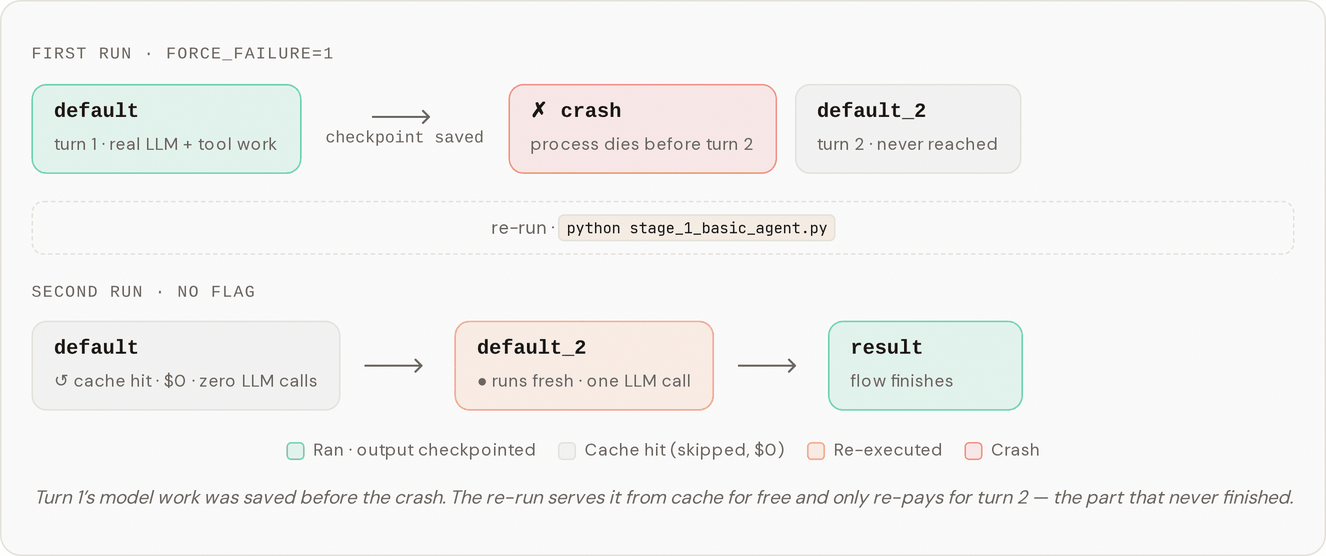
That second bill is what Stage 1 removes. Here is the shape of what changes once Kitaru is in the loop:
## Run it
The fastest way to feel this is to make the agent crash on purpose, then re-run it and watch the first turn come back for free.
The stage file uses a `FORCE_FAILURE` environment variable to fake a downstream blip between the two turns: turn 1 does its real work and gets saved, then the flow raises before turn 2 starts.
{% stepper %}
{% step %}
Crash on purpose, between the two turns.
```bash
FORCE_FAILURE=1 uv run python stage_1_basic_agent.py
```
Turn 1 (the `default` checkpoint) does its real LLM and shell work and is written to durable storage. Then the flow raises before turn 2 ever starts, and you see the failure printed at the end.
{% endstep %}
{% step %}
Re-run, this time for real.
```bash
uv run python stage_1_basic_agent.py
```
Now turn 1 is served straight from the cache (no model call, basically instant), turn 2 runs fresh, and the flow returns the combined result.
{% endstep %}
{% endstepper %}
## What you should see in the logs
Run both commands and watch the two checkpoints, `default` (turn 1) and `default_2` (turn 2). This is the part to check:
| | First run (`FORCE_FAILURE=1`) | Second run (no flag) |
| ----------- | ------------------------------------- | --------------------------------------------- |
| `default` | started → finished, several LLM calls | cached, instant, $0 |
| `default_2` | never runs (the flow raised first) | started → finished, one LLM call |
| Outcome | failure | prints the result, only turn 2 paid for again |
The first run pays for turn 1 and then dies. The second run gets turn 1 back from the cache for nothing and only spends money on turn 2, the turn that never finished the first time. The retry does not rebuild the work that already succeeded. That is the second bill, gone.
## What just happened?
Two different jobs were going on, and it helps to pull them apart, because they belong to two different libraries.
PydanticAI ran the agent loop. It decided what the model should do next, called the `exec` tool, fed the tool's result back to the model, and produced each turn's output. That is what PydanticAI is good at, and Stage 1 leaves it alone. The agent in the code is a plain PydanticAI `Agent`.
What PydanticAI does not do, and what no plain in-process agent loop does on its own, is survive the process dying. Its progress lives only inside that running Python process, so when the process goes, the progress goes with it.
That second job is Kitaru's. A single line wraps the agent:
```python
agent = KitaruAgent(agent, checkpoint_strategy="turn")
```
After that, each `agent.run_sync(...)` call becomes a Kitaru checkpoint. The moment a turn finishes, Kitaru writes its output to durable storage. One way to hold it in your head: the PydanticAI loop is what the agent is thinking right now, and Kitaru is what it has already written down and cannot lose. When a retry reaches a turn that already finished, Kitaru hands back the saved output instead of calling the model again.
The practical payoff is that you did not rewrite the agent as a state machine, learn a graph DSL, or change your control flow. It is still ordinary Python with one wrapper around the agent.
## Try one small change
Want to prove the cache is doing the work, rather than the task just being cheap the second time? Force every checkpoint to re-run with `DISABLE_CACHE`:
```bash
DISABLE_CACHE=1 uv run python stage_1_basic_agent.py
```
With the cache off, turn 1 re-executes from scratch every time, even when a finished copy is sitting in storage. Run it once normally, then once with `DISABLE_CACHE=1`, and watch the wall-clock time and the LLM call count for `default` jump back up. That gap is what the cache saves on every retry. The flag is also handy while you are editing the flow and want a clean run each time.
## How the code fits together
The stage uses a few plain Python objects:
* `Profile` is a Pydantic model that declares the agent's `name`, `system_prompt`, `model`, and `allowed_tools`.
* `build_agent(profile)` returns a vanilla PydanticAI `Agent` wired up from that profile.
* `build_tools(profile.allowed_tools, ...)` builds the toolset, adding only the tools whose names appear in `allowed_tools`.
* The flow body wraps that agent in `KitaruAgent(...)` and calls `run_sync()` once per turn.
The main control here is `Profile.allowed_tools`. Stage 1 sets it to `{"exec"}`, so the agent gets exactly one tool: a runner that executes a shell command in the host process. `build_tools` reads that set directly. If the profile did not ask for a tool, the code never builds that tool. Later stages add more names to the set and gain new capabilities. The older stage files keep working because the shared library only adds new tools; it does not remove the old ones.
## Why `checkpoint_strategy="turn"`
You will notice the wrapper passes `checkpoint_strategy="turn"`. That is a teaching choice, not a default you would normally set.
With the turn strategy, each `agent.run_sync()` turn becomes one checkpoint (`default`, then `default_2`). That keeps the log output clean enough to point at while you are learning, and it lands the `FORCE_FAILURE` crash neatly on a turn boundary.
In a real fork you usually drop the kwarg and take the default `checkpoint_strategy="calls"`, where every individual model request and every tool call gets its own checkpoint and its own cache key. A flow that crashed after the third model request then resumes by replaying only the calls after the third. The durability is the same, but the cache entries and dashboard rows are more precise.
## Where this leaves us
Stage 1 records the work that already finished. If the process dies, that work does not vanish with it.
But the agent is still running commands on the host machine. That is fine for a tiny first demo, and very much not fine for a shared platform. The next layer gives the agent a separate workspace, so it can use a shell without turning your laptop or server into its playground.
---
# Agent Instructions
This documentation is published with GitBook. GitBook is the documentation platform designed so that both humans and AI agents can read, navigate, and reason over technical content effectively. Learn more at gitbook.com.
## Querying This Documentation
If you need additional information that is not directly available in this page, you can query the documentation dynamically by asking a question.
Perform an HTTP GET request on the current page URL with the `ask` query parameter, and the optional `goal` query parameter:
```
GET https://docs.zenml.io/kitaru/agent-harness-platform/01-durable-agent.md?ask=&goal=
```
`ask` is the immediate question: it should be specific, self-contained, and written in natural language.
`goal` is optional and describes the broader end goal you are ultimately trying to accomplish on behalf of the user. GitBook uses it to tailor the answer towards what is most useful for that goal.
The response will contain a direct answer to the question and relevant excerpts and sources from the documentation.
Use this mechanism when the answer is not explicitly present in the current page, you need clarification or additional context, or you want to retrieve related documentation sections.